Component Features
The IDM application is logically divided into the following modules:
| Module | Description |
|---|---|
| Modeling | Create and define decision table structures |
| Manage Decision | Manage rules, decision tables, text rules, and rule chain |
| Admin Console | Configure applications and foundational metadata |
| Rule Simulation | Simulate and validate rule execution outputs |
Modeling Module
The Modeling module enables users to define and configure decision table structures using a guided and intuitive wizard-based interface.
This module acts as the foundation for creating reusable and structured rules.
Modeling Landing Screen
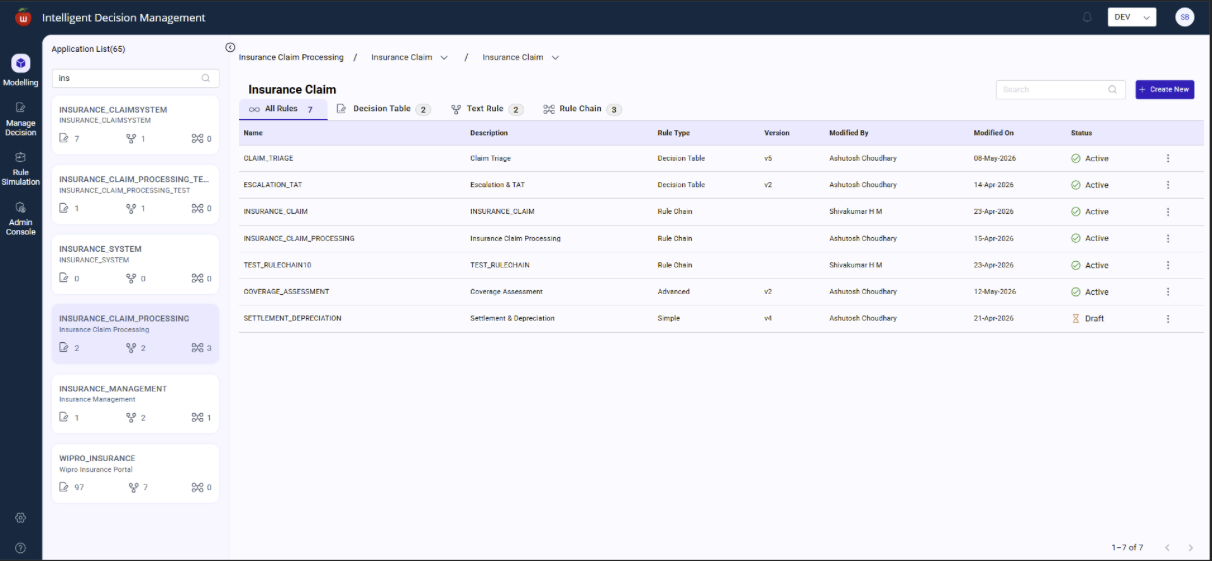
Create Rule
The Create Rule functionality allows users to create and configure different types of business rules within the IDM application. Users can initiate rule creation by clicking the Create Rule button.
The system provides a guided interface where users enter rule metadata and select the required rule type.
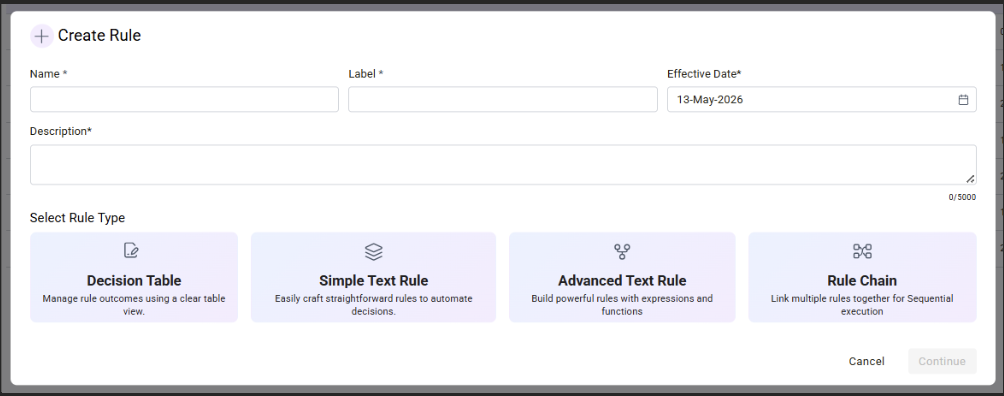
Rule Creation Fields
| Field | Description |
|---|---|
| Name | Unique system name for the rule. Used internally for identification and processing. |
| Label | Business-friendly display name shown on the UI. |
| Description | Detailed explanation of the rule's purpose, functionality, or business logic. |
| Effective Date | Defines the date from which the rule becomes active and applicable during execution or simulation. |
Select Rule Type
| Rule Type | Description |
|---|---|
| Decision Table | Decision Tables provide a structured tabular format for managing business decisions. |
| Simple Text Rule | Simple Text Rules allow users to define straightforward business logic using simple condition-action statements. |
| Advanced Text Rule | Advanced Text Rules support complex business logic with expressions, functions, and multiple nested conditions. |
| Rule Chain | Rule Chains enable orchestration with sequential and parallel execution of multiple rules. |
Decision Table Creation
Users can create decision tables using a step-by-step guided flow.
Step 1: Configuration
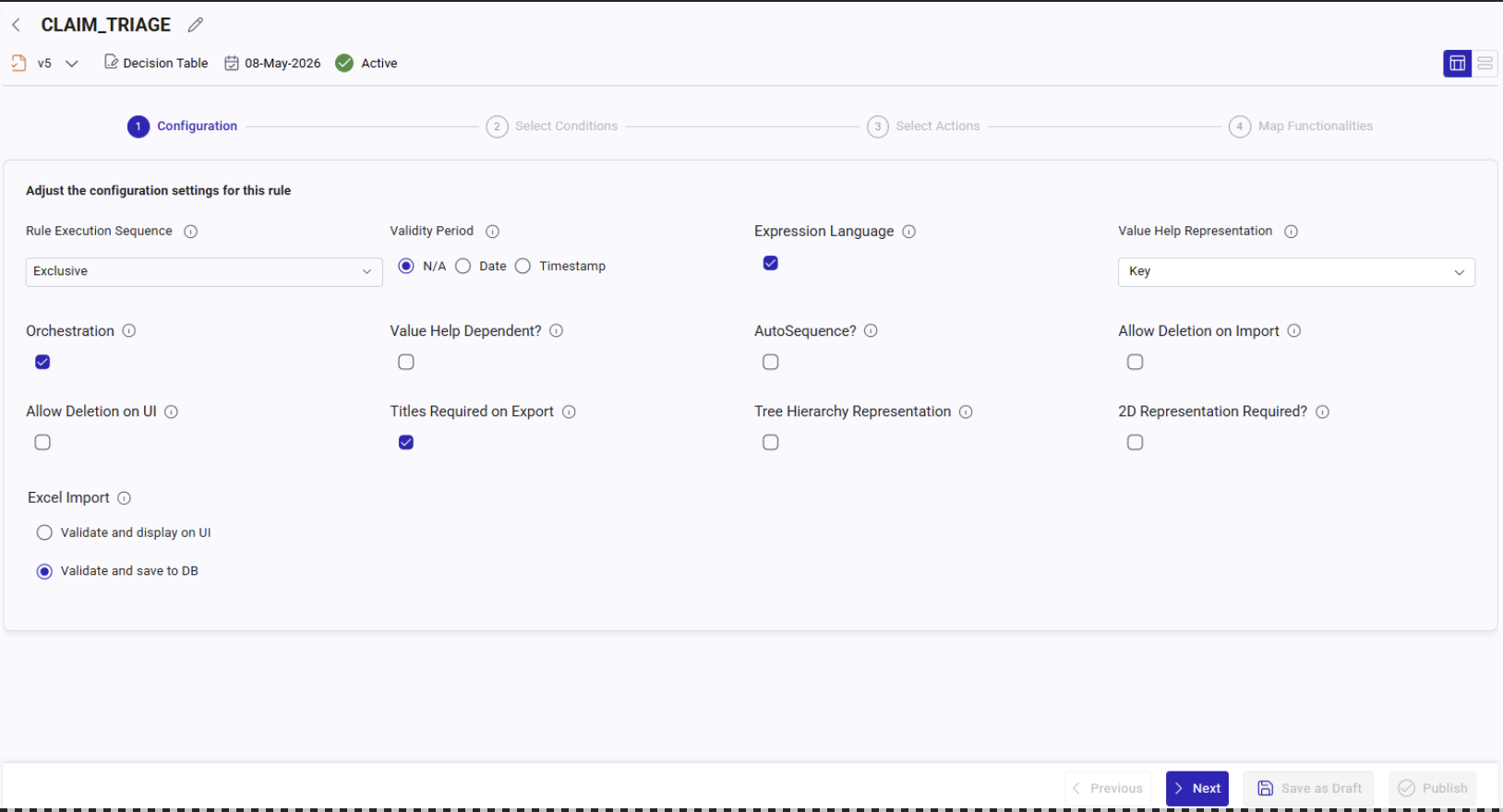
| Configuration Settings | Description |
|---|---|
| Rule Execution Sequence | Defines how rules should be executed when multiple rule conditions match. Controls whether the system executes only the first matching rule or all matching rules. |
| Validity Period | Defines the type of validity management for rule records. While executing, the valid from and valid to fields should be taken into consideration. N/A means no validity period is maintained for the rule. Date means rules are validated based on start and end dates. Timestamp means rules are validated using exact date and time. |
| Expression Language | Enables usage of expressions and functions within rules. |
| Orchestration | Supports sequential or parallel processing of rules while rule chaining. |
| Value Help Representation | Defines how value help fields are displayed to users. Example: key-value, key | value, key, value |
| Value Help Dependent? | Defines whether value help depends on another field selection. |
| AutoSequence? | Automatically generates sequence numbers for a field when adding new rule records. |
| Tree Hierarchy Representation | Displays rule data in hierarchical tree structure format. Useful for parent-child relationships. |
| 2D Representation Required? | Enables matrix or grid-style representation of rules. Useful for crosstab or matrix-based rules. |
| Allow Deletion on UI | Allows users to delete rule records directly from the UI. Enables manual cleanup or maintenance. |
| Titles Required on Export | Includes DT ID and DT Name in title during Excel export operation. |
| Allow Deletion on Import | Allows records to be deleted during Excel import processing. Deleted rows from import file deactivate the rule record in DB. |
| Excel Import | Enables importing rule data from Excel files. Supports bulk upload and maintenance. Validate and display on UI: validates imported data and displays validation errors on UI so users can review, correct, validate, and save from UI. Validate and save to DB: validates and directly saves valid records into the database. |
Step 2: Configuration
Reusable Object References
Users can:
- Reuse existing objects
- Create new objects
- Reference global catalogs
This promotes:
- Standardization
- Reusability
- Reduced duplication
Value Help Configuration
The module supports:
- Independent Value Help
- Dependent Value Help
Independent Value Help means values are selected independently.
Example:
- Country -> India, USA, Germany
Dependent Value Help means values depend on another field.
Example:
- Country = India
- State -> Maharashtra, Gujarat
Execution Sequence Configuration
Users can define execution behavior:
| Execution Type | Description |
|---|---|
| First Match | Stops execution after first matching rule |
| All Matches | Executes all matching rules |
Default Value Configuration
The module supports:
- Static default values
- Expression-based defaults
This minimizes manual data entry.
Rule Orchestration Support
Users can configure orchestration logic during modeling to support:
- Sequential execution
- Dependent processing
- Rule integration
Version Management
New versions of decision tables can be created whenever structural changes are required.
This ensures:
- Backward compatibility
- Controlled change management
- Version tracking
Admin Console Module
Overview
The Admin Console module provides centralized administrative configuration for IDM.
It allows users to define foundational structures required for rule creation and governance.
Key Functionalities
Application Management
Users can create and manage applications.
Applications act as top-level containers for:
- Rule Maintenance Sets
- Rule Sets
- Decision Tables
- Text Rules
Rule Maintenance Set (RMS)
RMS acts as a logical grouping layer for rule sets.
Used for:
- Functional segregation
- Business domain organization
Rule Set Management
Rule Sets group related rules together.
Used for:
- Domain-specific rule organization
- Execution grouping
Action Type Configuration
Users can define configurable action types used in:
- Decision Tables
- Text Rules
- Rule Chains
Field Catalog Management
The system supports:
- Application Field Catalog
- Global Field Catalog
These catalogs define reusable business fields.
Guided Configuration Flow
The module provides guided flows for:
- Structure creation
- Metadata configuration
- Dependency setup
This simplifies onboarding for business users.
Content Migration Support
The system settings functionality enables migration of IDM content across environments.
Supported migrations:
- DEV -> QA
- QA -> UAT
- UAT -> PROD
Migration is supported through:
- JSON packaging
- Export or Import mechanism
Manage Decision Module
Decision Table Management
Overview
This module enables authorized users to maintain and manage decision table rules.
Access is controlled using IDM authorization mechanisms.
Supported Interfaces
The platform supports multiple interfaces for rule management:
| Interface Type | Description |
|---|---|
| Spreadsheet View | Excel-like rule maintenance |
| Form Interface | Structured form-based editing |
| 2D Matrix View | Matrix-based rule visualization |
| Tree Interface | Hierarchical representation |
| Graphical Interface | Visual rule management |
Bulk Operations
Supports:
- Mass rule addition
- Bulk editing
- Multi-record updates
This improves operational efficiency.
Variant Smart Table Concept
Decision table fields are managed using the Variant Smart Table concept.
This enables:
- Dynamic field rendering
- Flexible layouts
- Configurable structures
Rule Validity Management
Each rule can have:
- Valid From date
- Valid To date
- Status
Supported statuses:
- Draft
- Active
- Inactive
Validation Features
The platform supports:
- Data validation
- Mandatory field checks
- Date-split logic
This ensures data integrity and prevents overlapping rule periods.
Spreadsheet Import or Export
Rules can be:
- Exported to spreadsheets
- Imported from spreadsheets
Import validations include:
- Missing data
- Invalid formats
- Dependency checks
Audit and Activity Tracking
The system tracks:
- Record-level audit changes
- User activities
- Rule modifications
This supports governance and traceability.
Additional Features
- File upload support
- Comment management
- Dynamic filtering
- Pagination
- Enhanced search capabilities
Text Rule Management
Overview
Text Rules allow users to define complex rule logic using flexible conditional structures.
The rule structure follows:
- IF -> THEN -> ELSE
Key Functionalities
Dynamic Rule Configuration
Users can dynamically configure:
- Conditions
- Operators
- Action fields
- Action values
Unlimited Rule Complexity
The system supports:
- Unlimited conditions
- Unlimited actions
- Nested rule structures
Flexible Operators
Supported operators include:
- Equals
- Not Equals
- Greater Than
- Less Than
- Contains
- Between
Audit and Activity Logs
The platform maintains:
- Rule block audit tracking
- Activity history
- Change logs
Additional Features
- File upload support
- Comment functionality
- Pagination
- Dynamic search
- Undo or Redo operations
Rule Chain Module
Overview
Rule Chaining enables graphical orchestration of multiple rules into a unified execution flow.
Key Functionalities
Graphical Rule Linking
Users can visually connect:
- Decision Tables
- Text Rules
- Other Rule Chains
Sequential Execution
The output of one rule can become input to another rule.
This supports:
- Multi-step processing
- Dependent rule execution
- Workflow orchestration
Unified Simulation and Execution
Entire rule chains can be:
- Simulated
- Executed
- Validated
as a single entity.
Rule Simulation Module
Overview
The Rule Simulation module enables users to validate and test rule behavior before deployment.
Supported Simulations
Users can simulate:
- Decision Tables
- Text Rules
- Rule Chains
Simulation Inputs
Users can provide:
- Conditions
- Input fields
- Test values
to evaluate rule outcomes.
Version-Based Simulation
Simulations can be executed based on:
- Specific rule versions
- Validity date ranges
- Modified rule policies
Simulation Preview
Simulation results are displayed on dynamic preview screens.
The preview adapts based on:
- Rule type
- Execution structure
- Output format
Simulation Output
The preview displays:
- Matching rules
- Triggered actions
- Output values
- Executed rule blocks
This helps users:
- Validate configurations
- Analyze rule behavior
- Improve rule accuracy
Security and Access Control
The IDM platform supports:
- Role-based access control
- Hierarchy-level authorization
- User or group-based permissions
Access can be configured for:
- Applications
- RMS
- Rule Sets
- Decision Tables
- Text Rules
Audit and Governance
The system provides enterprise-grade governance capabilities including:
- Audit logs
- Version management
- Activity tracking
- Change history
- Rule lifecycle management