Overview
Requirement and Scope
Project Overview
The Intelligent Work Access (IWA) application is a centralized platform that manages user authorization across multiple enterprise applications. It enables secure provisioning and de-provisioning of roles validated by business stakeholders, while also supporting temporary access to specific roles when required. The tool integrates seamlessly with Azure AD and SAP BTP CIS, ensuring uniformity in access control across systems.
In addition, IWA provides advanced features such as user lock/unlock, activation, substitution, and activity logging. By consolidating these capabilities, IWA delivers secure, consistent, and efficient access governance, helping organizations improve compliance, reduce administrative effort, and maintain strong control over enterprise application access.
In-Scope Activities
| S.No | Activity | Description |
|---|---|---|
| 1 | User Management | Covers user overview and management in IWA, user creation or import from external systems, profile maintenance, activation and deactivation, role and data access control, account locking and unlocking, substitution management, and handling multiple system user IDs. |
| 2 | Role Management | Involves role management within IWA using standard and exception role types, where roles are built for specific applications. It includes defining module- and feature-level access, API access, and data-level access to control application usage, as well as mapping external source groups or role collections to IWA roles. |
| 3 | Group Management | Covers group management within IWA, enabling the creation of role groups by combining multiple roles and assigning them to users. |
| 4 | Provision Module | Involves managing user role provisioning segregated by application within IWA, including role assignment and de-assignment, user–role association, and status tracking across the role lifecycle. It also covers enforcement of data-level access controls to ensure secure and compliant access to application resources. |
| 5 | Application Management | Involves configuring application master data within IWA, including basic application details (name and description), source and source-group mappings, defined email domains, application modules and features, APIs, and data attributes. It also covers configuration of email notifications and user events, serving as a single, centralized point for maintaining all application metadata within IWA. |
Application Overview
Business Process Flow
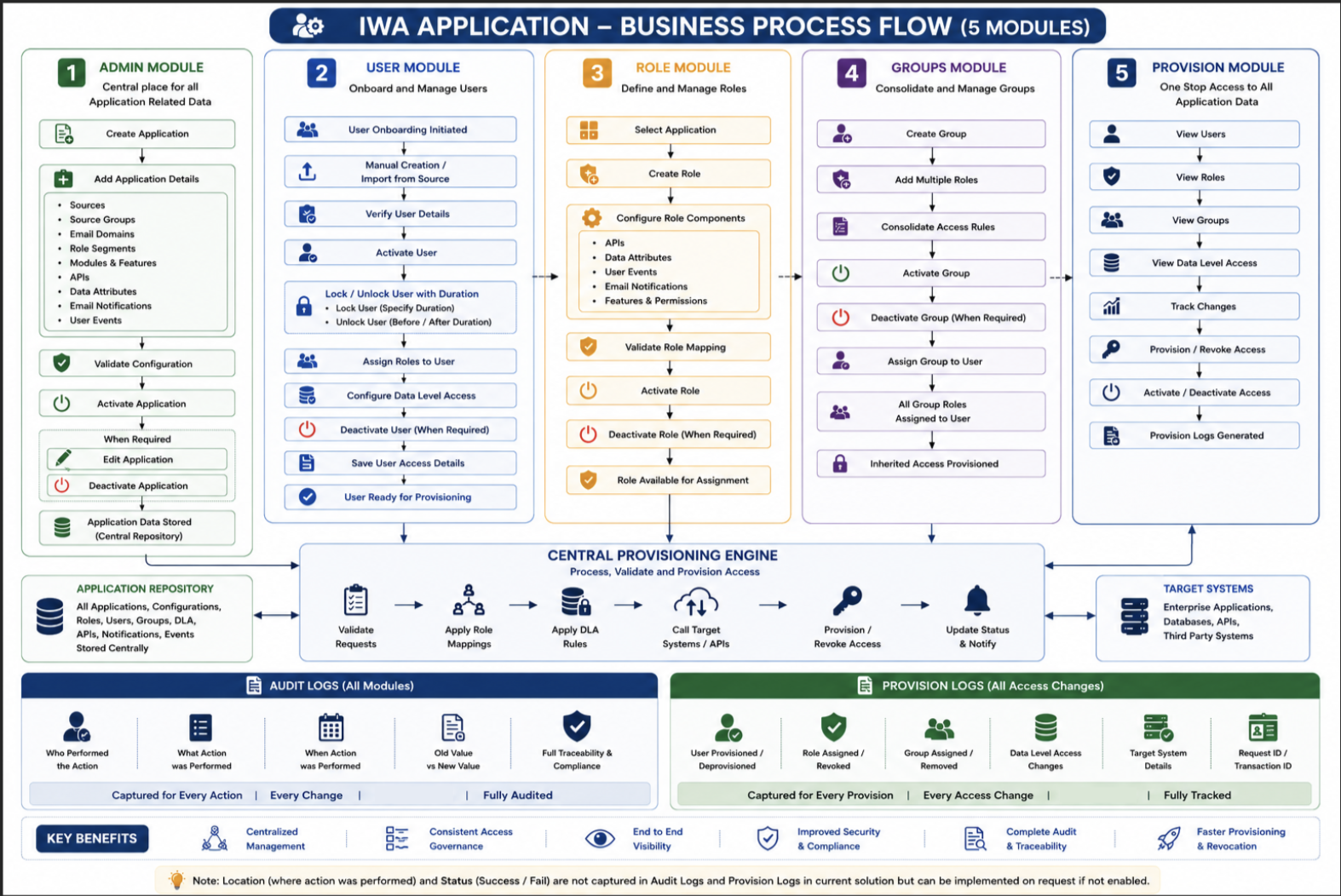
The IWA business process flow covers the end-to-end lifecycle of user access management — from application onboarding and role definition through to user provisioning, approval workflows, and eventual de-provisioning. The flow ensures that every access grant or revocation is traceable, auditable, and aligned with business authorization policies.
Solution Architecture Diagram
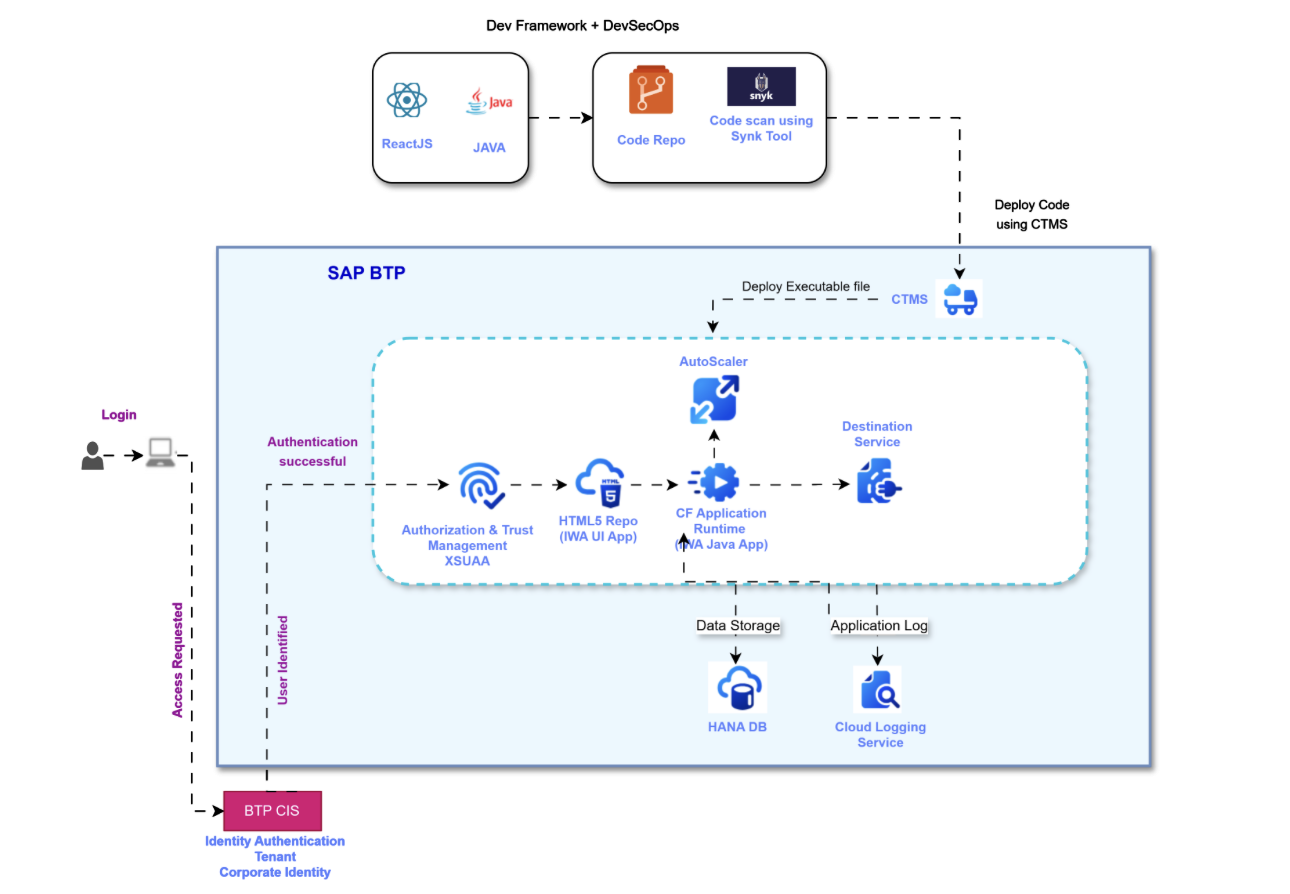
IWA integrates with the following enterprise identity and access systems:
- SAP BTP CIS — for role collection mapping and source group synchronization
- Azure Active Directory (Azure AD) — for external user identity federation
- SAP BTP Account — for user onboarding from external sources
Application Login
IWA uses the SAP Authentication login page as the gateway for users to access the application securely. Users are required to provide valid credentials — typically a username/email and password — to authenticate and gain authorized entry into the environment. The login page incorporates robust security measures to protect sensitive data and ensure secure access.
- If a user lacks role access to the IWA application, they will encounter an Access Denied screen.
- After successful login, the user is presented with the IWA home page, from which they can navigate to User Management, Role Management, Group Management, Provision, and Application Management modules.